
What Ayla Is For
Ayla is AiCarer's voice-based check-in companion. She allows the person being cared for to complete structured wellbeing check-ins over the phone, which is especially helpful for people who are less comfortable navigating apps themselves.
The simplest way to think about Ayla is that she turns routine care check-ins into something consistent, repeatable, and reviewable. Instead of relying on memory after a phone call, the carer receives a documented outcome.
How a Voice Check-In Works
At a high level, every voice check-in follows the same five steps:
- 1
A call is scheduled or triggered.
- 2
Ayla phones the person being cared for.
- 3
Ayla asks a structured set of questions.
- 4
The person's answers are captured.
- 5
A summary returns to the carer in the app.
This makes Voice AI both a contact tool and a reporting tool.
The Call Experience
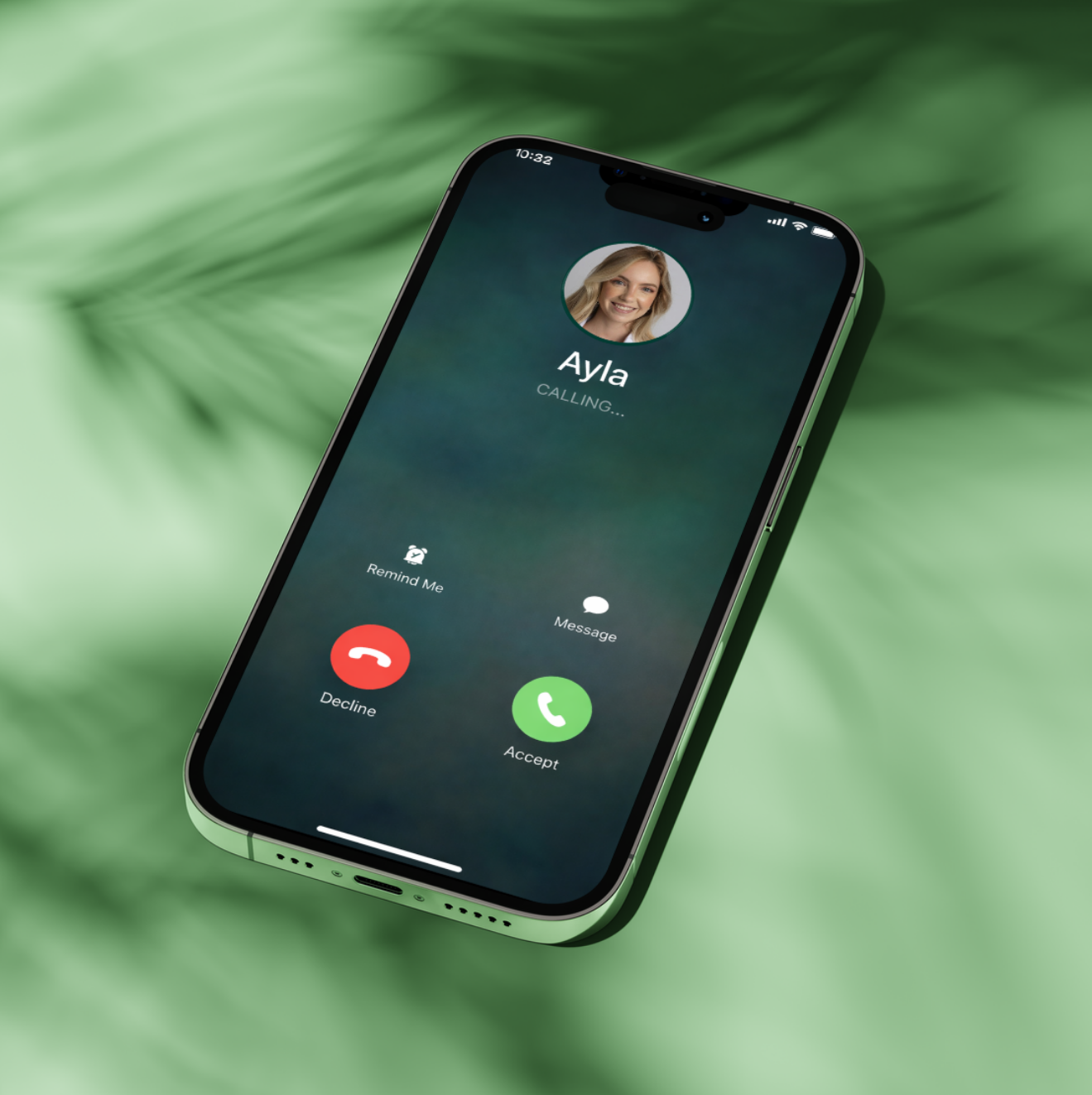
When Ayla calls, the person being cared for simply answers the phone and talks. Nothing needs to be typed, tapped, or navigated. The screen below is what they see while the call is connecting, and it shows the human side of the feature: the person is being called, not asked to fill out a complicated form.
What the Carer Gets Back
Once the conversation ends, the carer opens the call details page in the app. This is usually the most important screen in the chapter, because it is where a spoken conversation becomes a record that can be reviewed, compared, and shared.
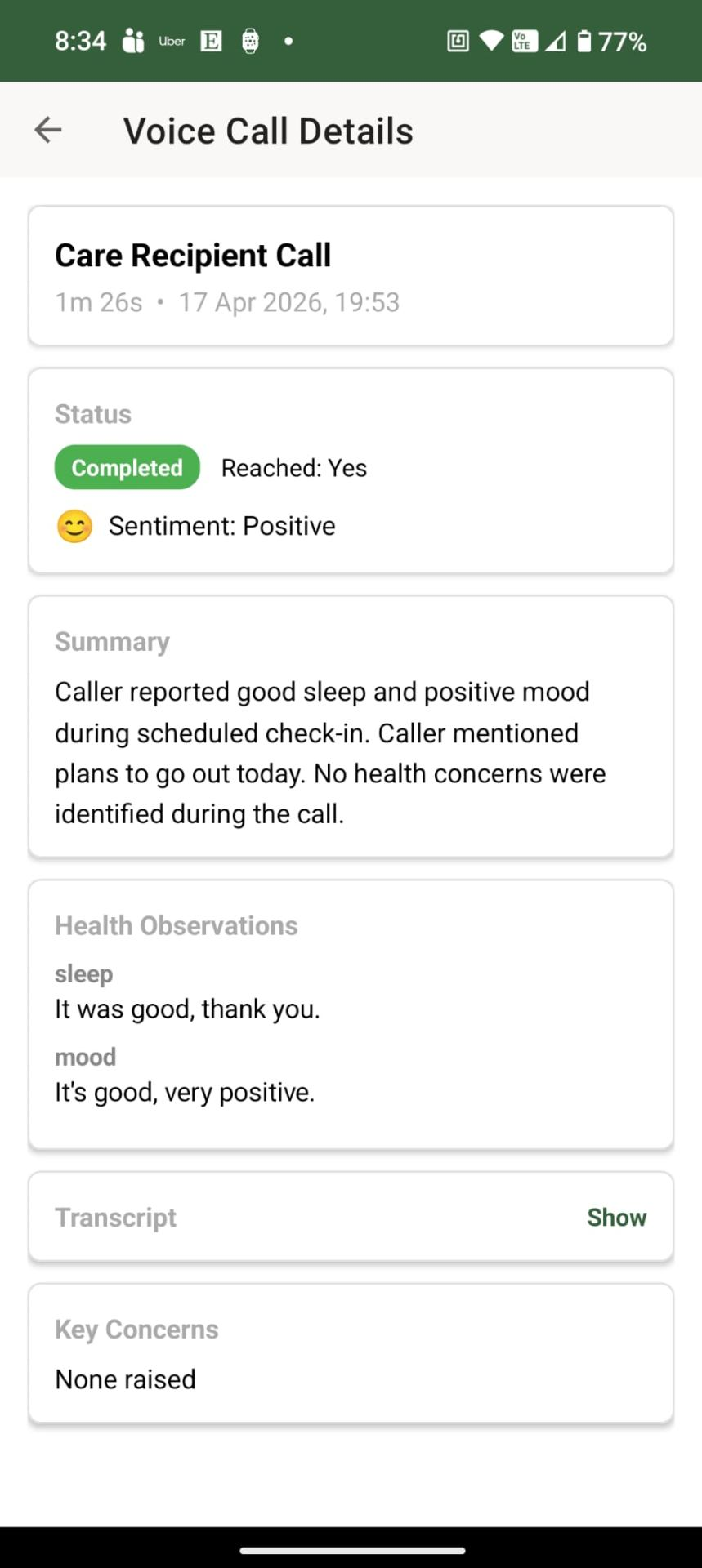
This screen brings several layers of information together:
- Whether the call was completed.
- Whether the person was reached.
- The general sentiment of the call.
- A written summary.
- Specific health observations
- Access to a full transcript
- Any key concerns that were raised
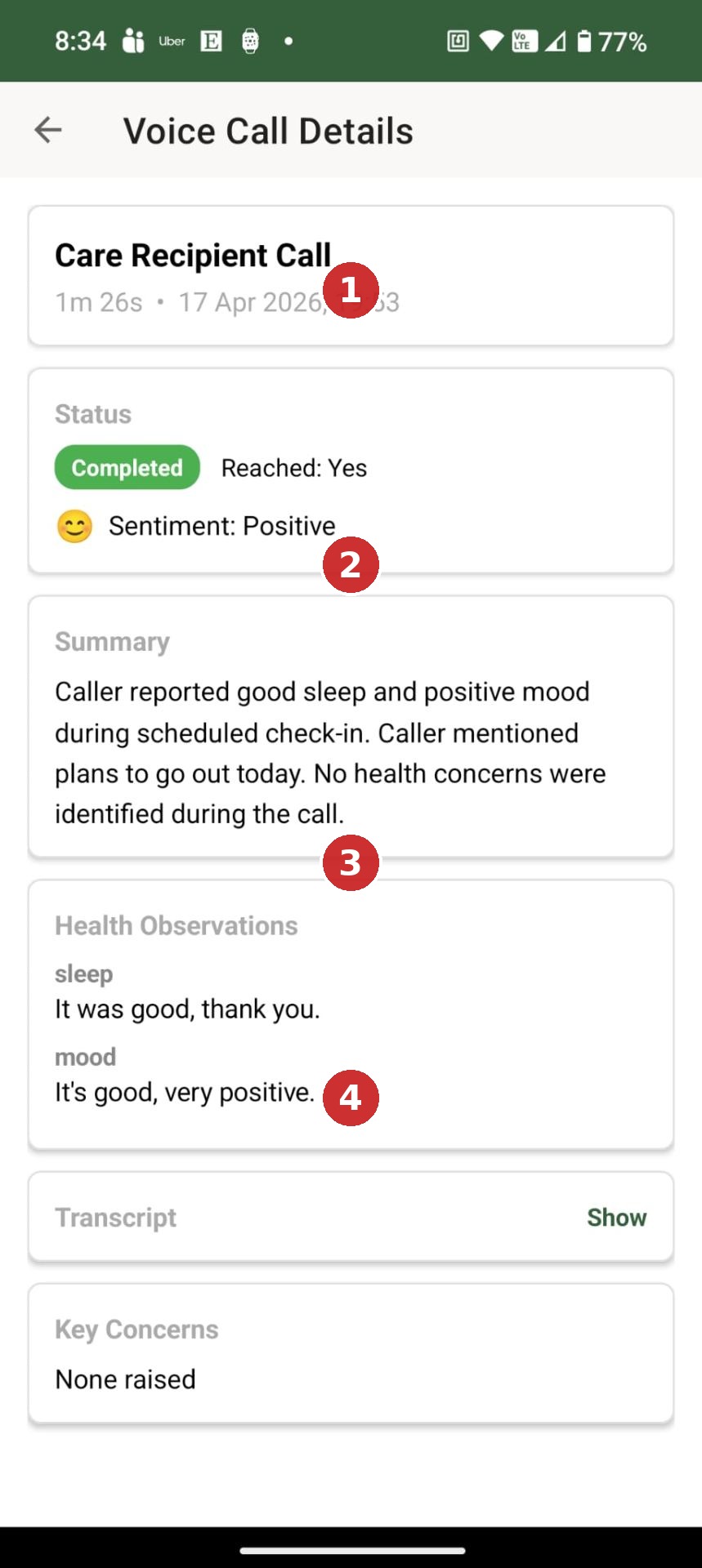
The annotated version below highlights each of those areas in the order a carer would normally read them.
What's on this screen
① Call Status
Shows whether the call completed, whether the person was reached, and the overall sentiment of the conversation.
② Call Summary
A short, plain-language summary of what was discussed, so a carer doesn't need to listen to the full call.
③ Health Observations
Pulls out specific answers — such as sleep and mood — as their own reviewable items.
④ Transcript & Key Concerns
Gives access to the full word-for-word transcript, plus a dedicated list of anything flagged as a concern during the call.
Taken together, this shows that Ayla does more than place a call. She organises the conversation into something that can be reviewed later.
Scheduling and Adjusting Calls
Calls are flexible. A carer can schedule check-ins at times that suit the person being cared for, then adjust those schedules later as routines change.
That makes the feature useful for situations such as:
- Morning medication check-ins
- Evening "how was your day" calls
- Post-appointment follow-ups
- Regular wellbeing touchpoints for someone living alone
STEP 1 — Create a Schedule
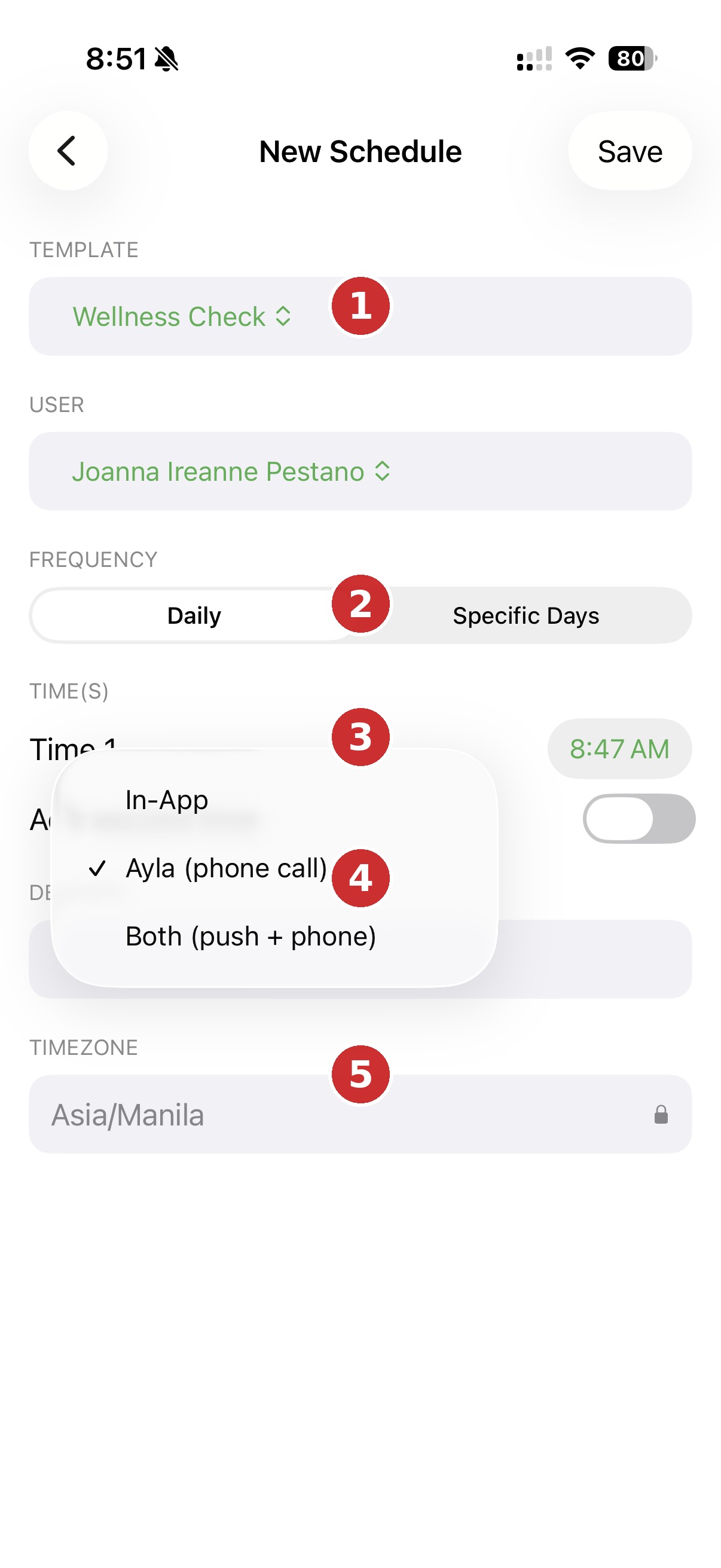
Creating a new call schedule uses a simple form. The carer chooses a template (such as Wellness Check), the person it applies to, and how often it should repeat — either Daily or on Specific Days.
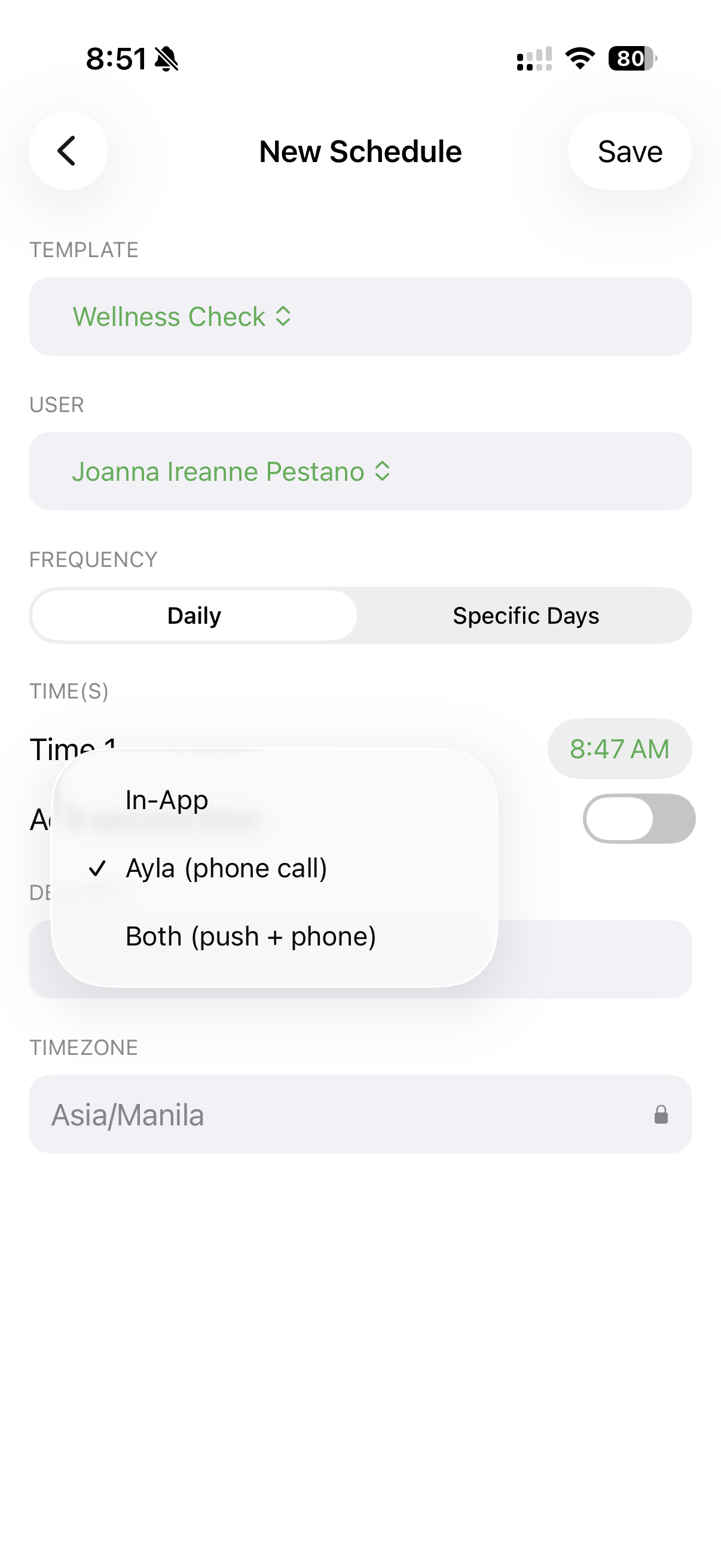
The annotated version below explains each field on the form, from the top of the screen down.
What's on this screen
① Template & User
Chooses which check-in template to use and which person it applies to.
② Frequency
Sets whether the schedule repeats Daily or only on Specific Days.
③ Time
Sets the exact time the check-in should take place.
④ Delivery Method
Chooses whether the check-in arrives In-App, through Ayla as a phone call, or Both.
⑤ Timezone
Locks the schedule to the person's timezone, so times stay accurate no matter where the carer is managing it from.
STEP 2 — Choose a Delivery Method
After selecting when the check-in should occur, the next step is deciding how it should be delivered. Delivery is not limited to a phone call: a schedule can be set to In-App, Ayla (phone call), or Both, so the carer can choose whether the check-in arrives as a call, an in-app prompt, or both together.
STEP 3 — Edit Anytime
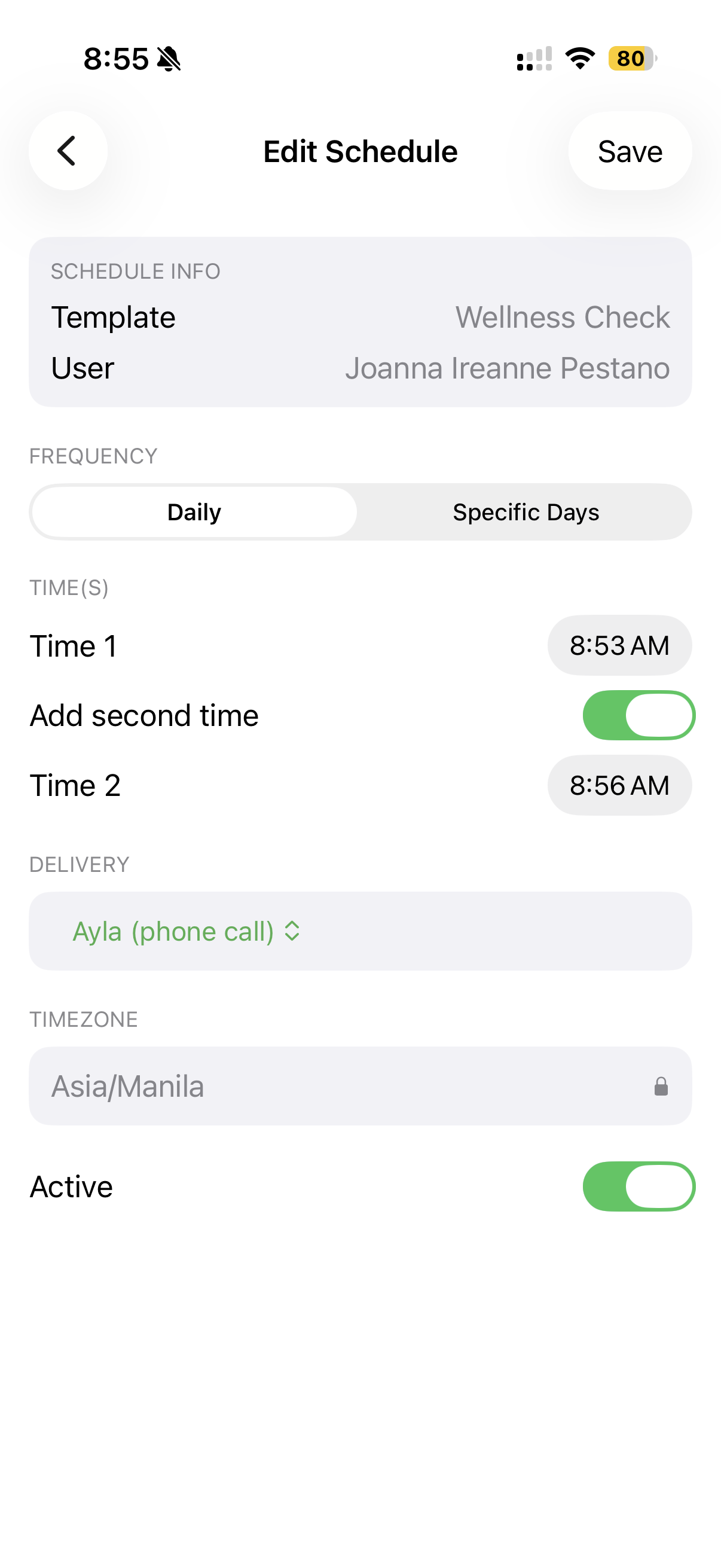
Once a schedule has been created, it can be updated at any time as routines or care needs change. The same schedule can be reopened and edited — times adjusted, a second call time added, or the delivery method changed — without recreating it from scratch.
What the Person Being Cared For Sees
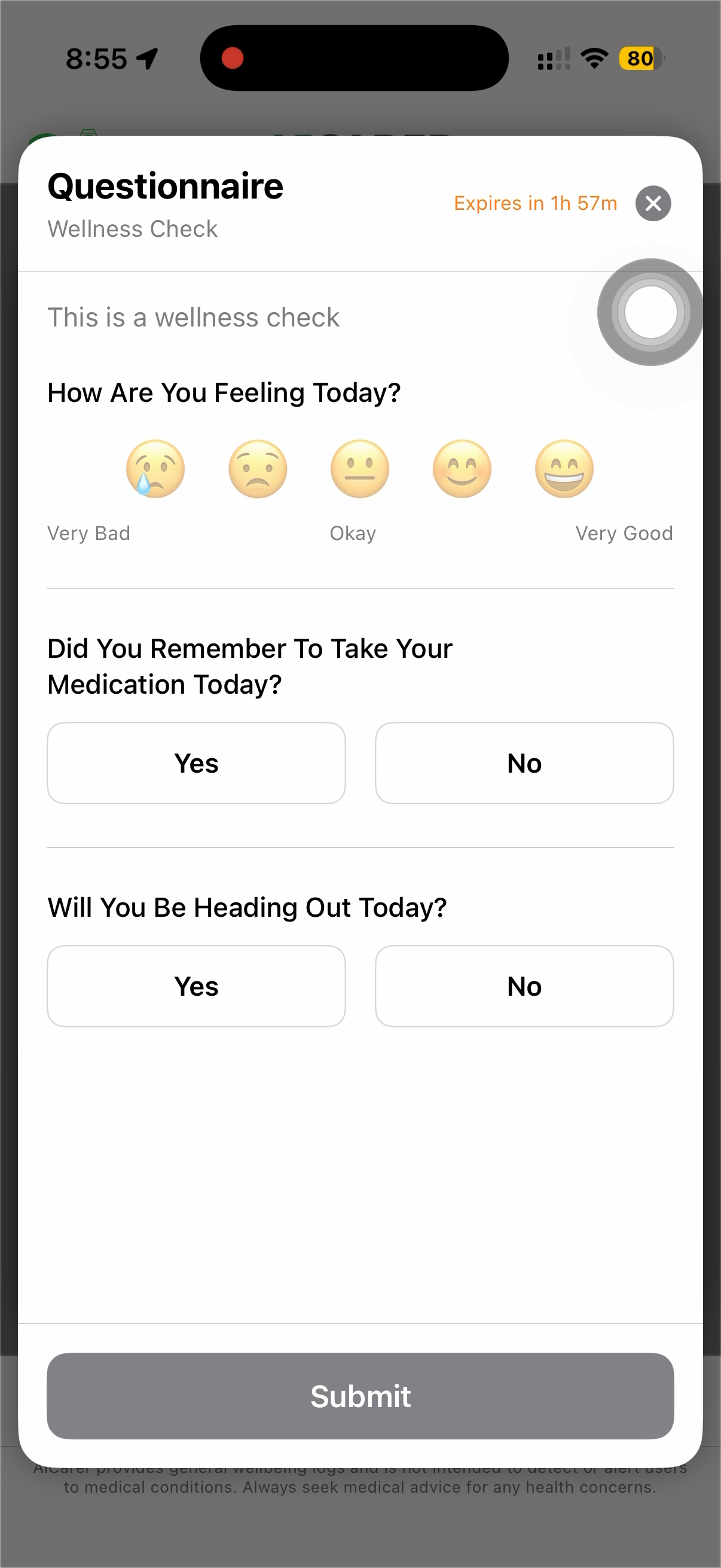
When a scheduled check-in takes place, the person being cared for sees a short questionnaire like the one below. It is deliberately brief, uses large tap targets, and displays how long the check-in remains available.
The Expiry Window
Scheduled check-ins are available only for a defined period of time, shown on the questionnaire itself. If the check-in is not completed before that window closes, it expires automatically and no longer appears.
This is intentional. A check-in is meant to capture how someone is feeling at a particular point in the day — a morning medication check answered late at night would no longer reflect the wellbeing question that was asked. Expiring the prompt keeps the answers meaningful and keeps the record accurate.
If a check-in expires, nothing is lost or broken. The next scheduled check-in still takes place as normal, and the carer can see that the earlier one was not completed.
Behind the scenes: AiCarer stores the schedule against the person's timezone, so the check-in takes place at the right local time regardless of where the carer set it up.
Expected result: At the scheduled time, the person being cared for receives the check-in through whichever delivery method was chosen, and a summary comes back to the carer afterwards.
Surveys and Reminders Work Alongside Calls
After the check-in is completed, AiCarer automatically processes the responses and returns a structured summary to the carer. Voice calls are only one way that information can be gathered, though — they sit alongside surveys and reminders so carers can build a more complete support rhythm.
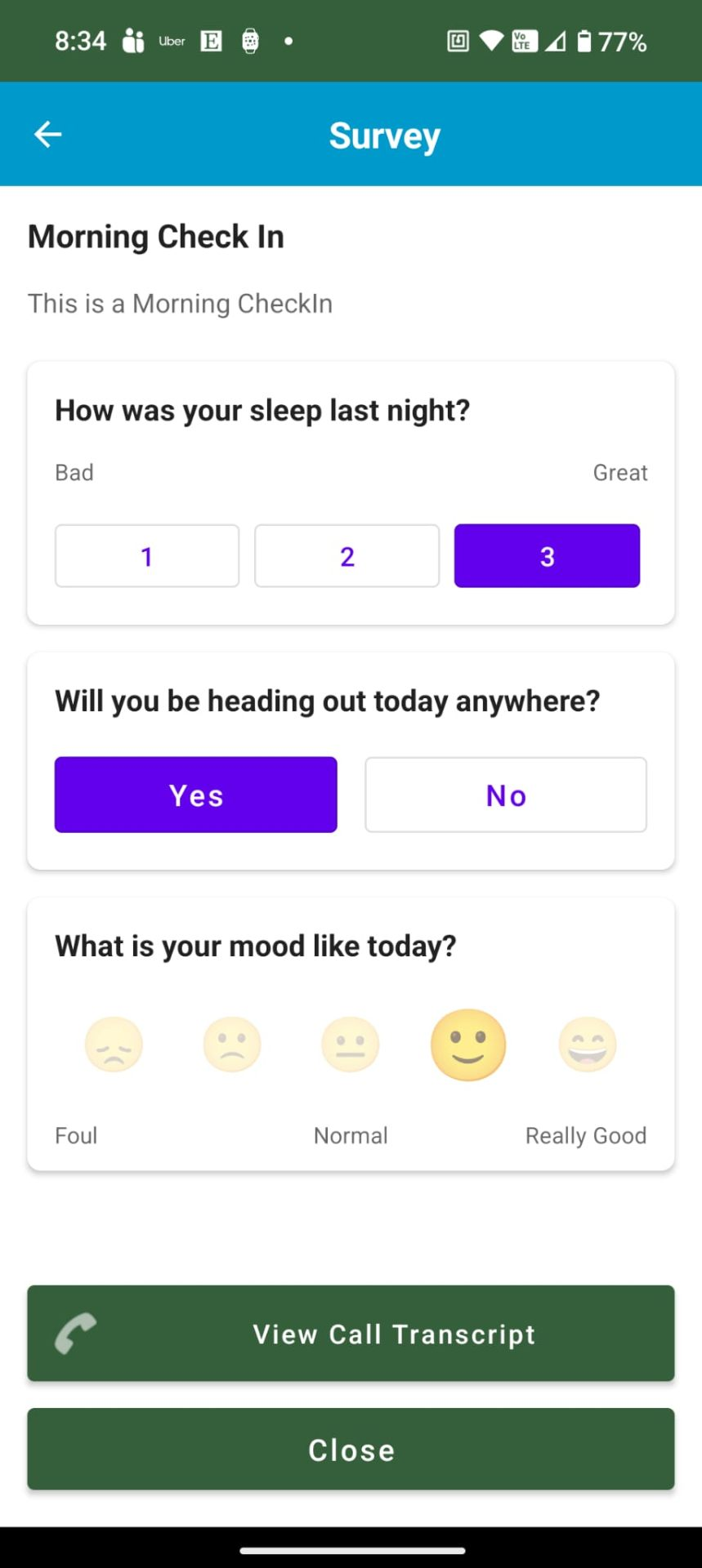
This screen shows that AiCarer can ask for structured responses in more than one way. Some follow-ups arrive as a survey or reminder in the app, while others come through a voice call with Ayla.
When Voice AI Helps
Voice AI is especially valuable when:
- The person being cared for is less confident with smartphone apps.
- A carer wants a repeatable daily or weekly routine.
- The family wants a written record of what was said.
- Support teams need a faster review than listening back to full calls.
It gives carers a structured summary without removing the personal nature of a spoken check-in.
Voice AI in Everyday Care
Pulling it all together, Ayla plays a simple but steady role in day-to-day care:
- Ayla makes routine wellbeing check-ins simple and consistent.
- Voice calls stay accessible for people who are less comfortable using smartphone apps.
- Carers receive structured summaries instead of relying on memory.
- Voice AI works alongside AiCarer Complete rather than replacing it.
- Together, they combine human conversation with continuous wellbeing monitoring.
In everyday use, Ayla answers the question "how are they today?", while AiCarer Complete quietly watches the patterns underneath. The next chapter looks at the other half of that picture: how more than one person can share the same care view, so that no single carer has to hold it all on their own.