
Wellness Logs record individual wellbeing events and provide important context such as location, event details and AI-generated insights. Wellness Reports look across a longer period to identify trends and changes over time, helping carers understand the bigger picture.
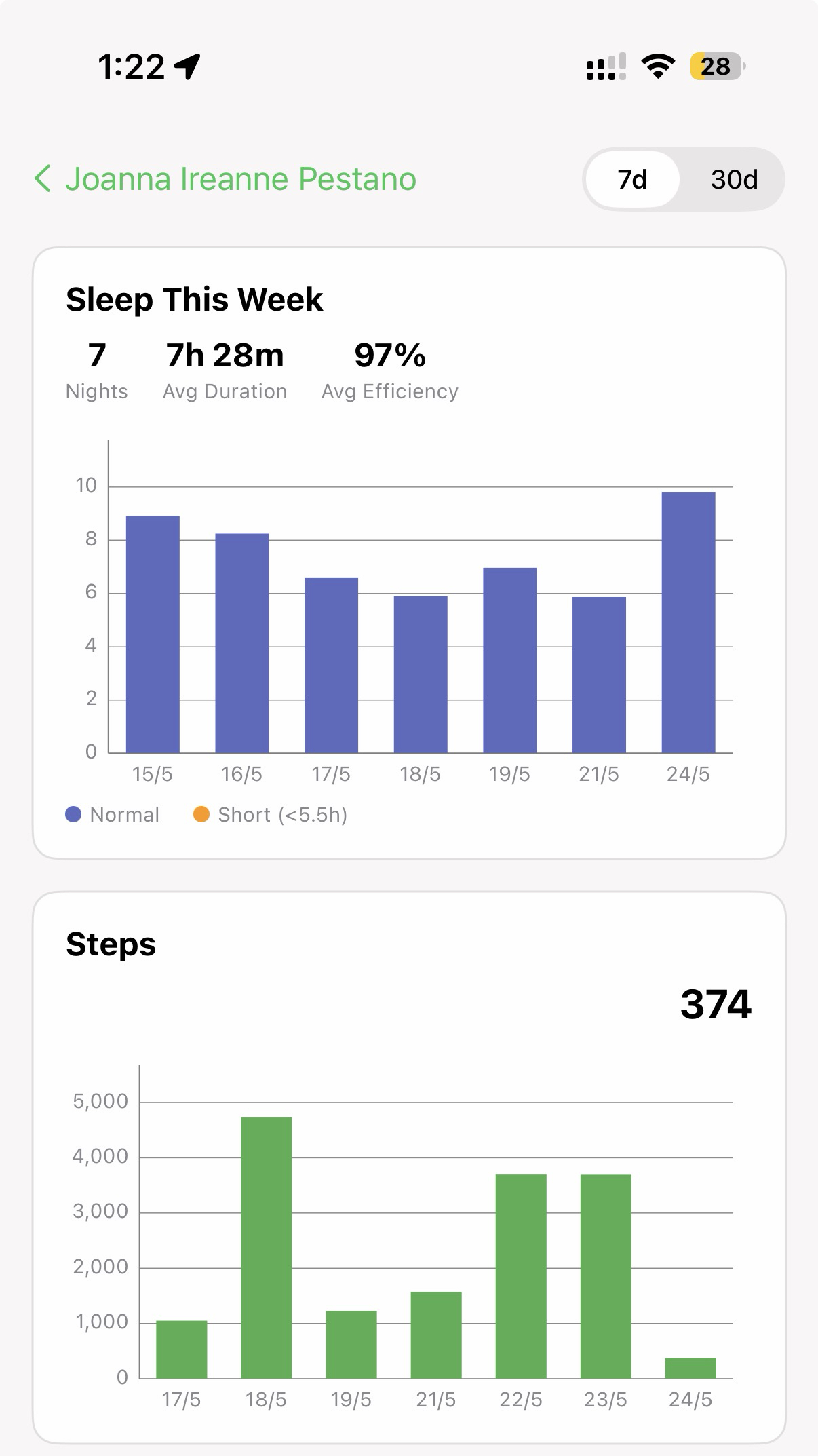
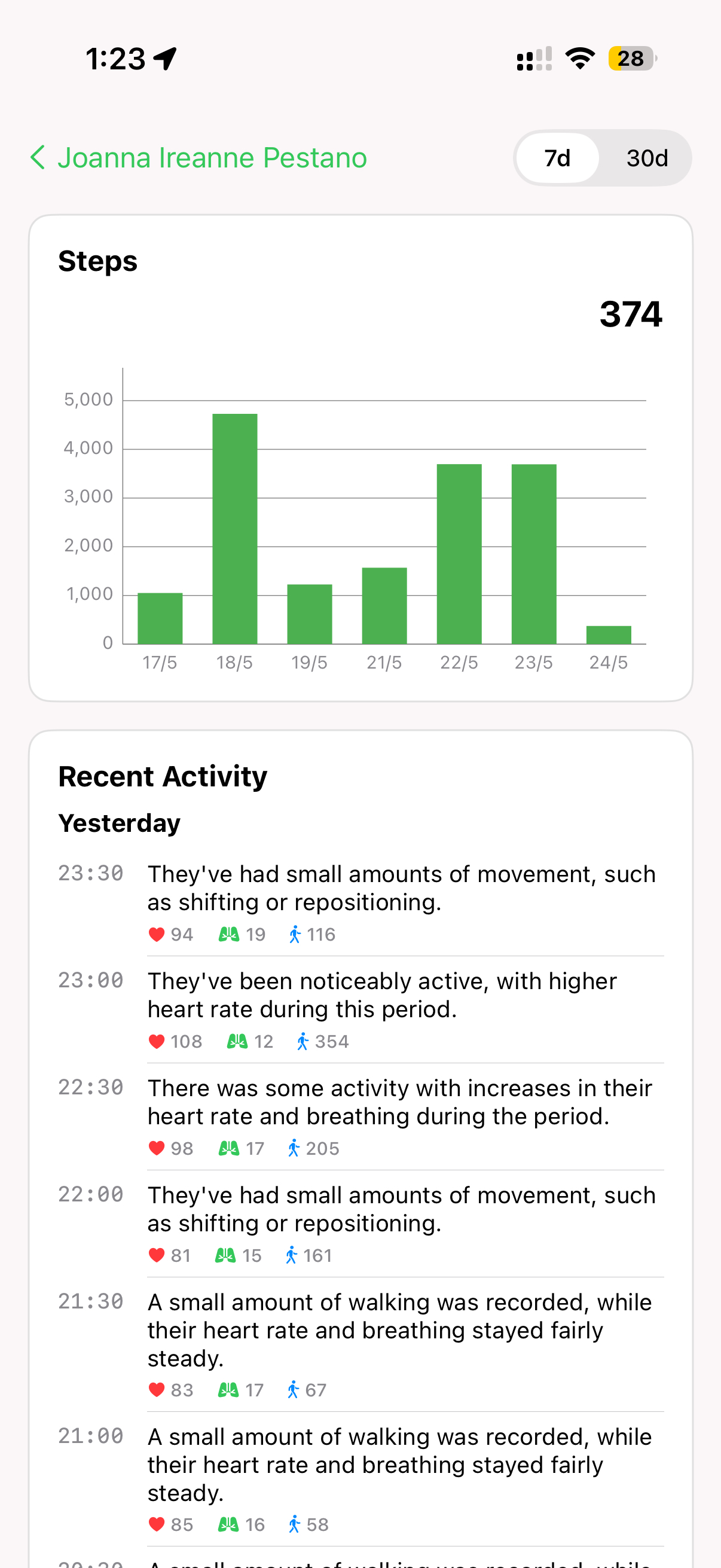
Reports include supporting detail such as sleep and step patterns, along with a timestamped record of recent activity.
What a Wellness Log Is
A Wellness Log is a record of a single wellbeing event. It is not a report. It captures what happened, when it happened, and the information AiCarer gathered around that moment, so a carer can look back later and understand the situation.
A Wellness Log can be created in two ways:
- Automatically, when AiCarer notices something worth surfacing.
- Manually, when a carer requests one because they want an updated picture.
What Is Inside a Wellness Log
Each Wellness Log brings together the details of one wellbeing event in a single place:
- Date and time — when the event happened.
- Event source — what created the log, such as an automatic detection or a carer request.
- Current label — the tag currently applied to the event, if one has been set.
- View Location — a link to see where the person was at the time.
- AI-generated Wellness Description — a short plain-language explanation of what AiCarer observed.
- Event details — the supporting information gathered around the event.
- Labelling — the ability to add or update a label yourself.
Not every Wellness Log will contain every type of information. What is shown depends on what triggered the event and what information was available at the time. Some logs may be brief, while others include more detail.
Labels help carers categorise events so they are easier to search, organise and compare over time. For example, a label might be Exercise, Driving, Feeling Unwell or another category that matches what happened. Carers can add or update labels at any time. Labels make Wellness Logs easier to find and review in groups, but they do not change the original event recorded by AiCarer.
Where a Wellness Log Begins
The first thing you see is the request confirmation. This screen appears as soon as a carer asks for a new Wellness Log, and it reassures them that the request has been received and the app has started gathering what it needs.
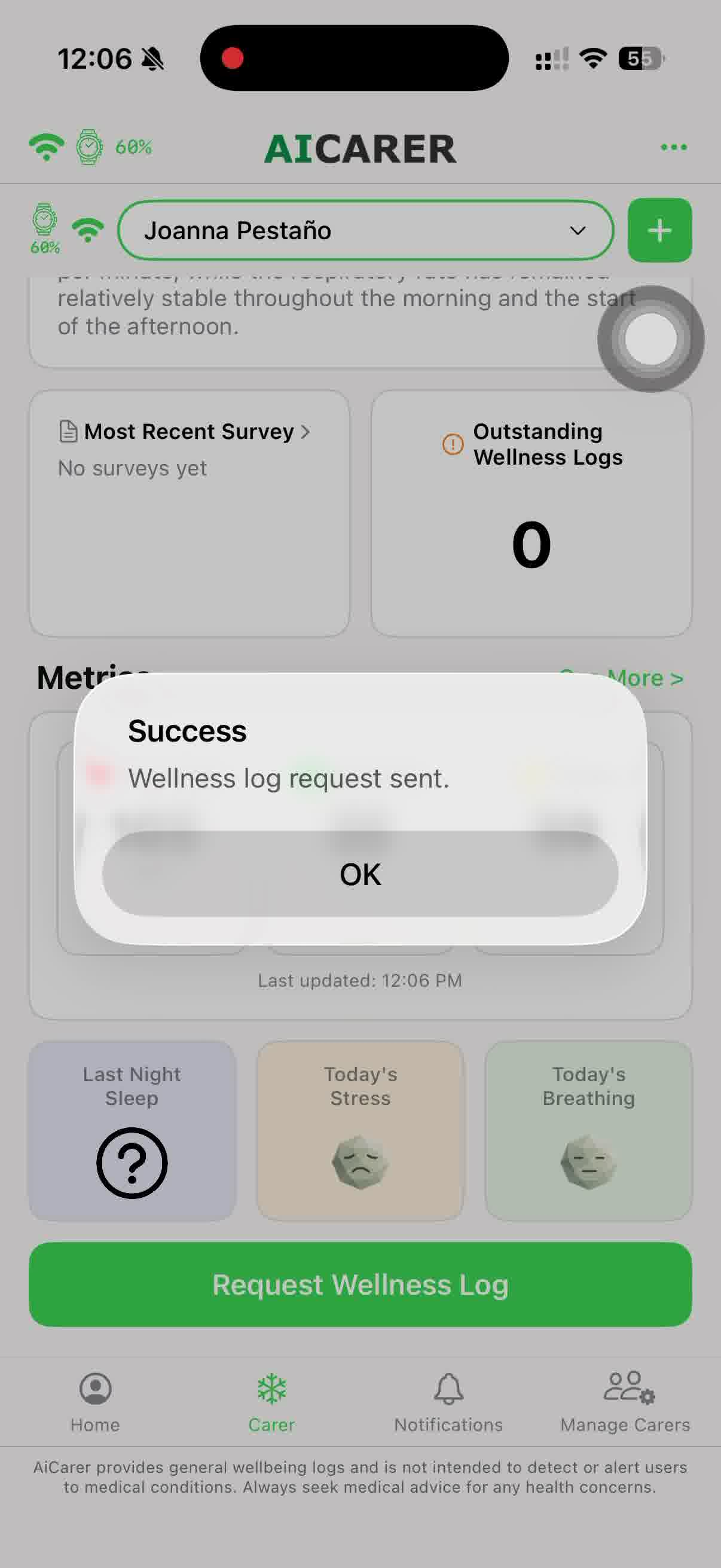
The main thing to notice here is that a Wellness Log is not instant. There is a short collection period while recent information is gathered and organised.
What Happens During the Waiting Period
When a carer requests a Wellness Log, AiCarer processes the request before making the completed Wellness Log available in the Wellness Logs section. During that window, the app assembles a more complete picture that can include:
- Recent wearable information.
- Movement and activity patterns.
- Stability indicators.
- Location context, where relevant.
- A comparison against the person's typical pattern.
This waiting period applies to requested Wellness Logs and is expected behaviour rather than a delay or an error. It gives AiCarer time to collect and organise the most recent information so the finished Wellness Log reflects a genuine picture rather than a snapshot of a single moment.
Wellness Reports Are Separate
A Wellness Report is a different feature. Where a Wellness Log records one event, a Wellness Report looks across a period of time and describes how someone has been doing overall. The sections below describe Wellness Reports.
Reading the Wellness Report Overview
The first screen of a Wellness Report works like an overview card for the whole period being assessed. It is the quickest way to see how things stand before looking at any detail.
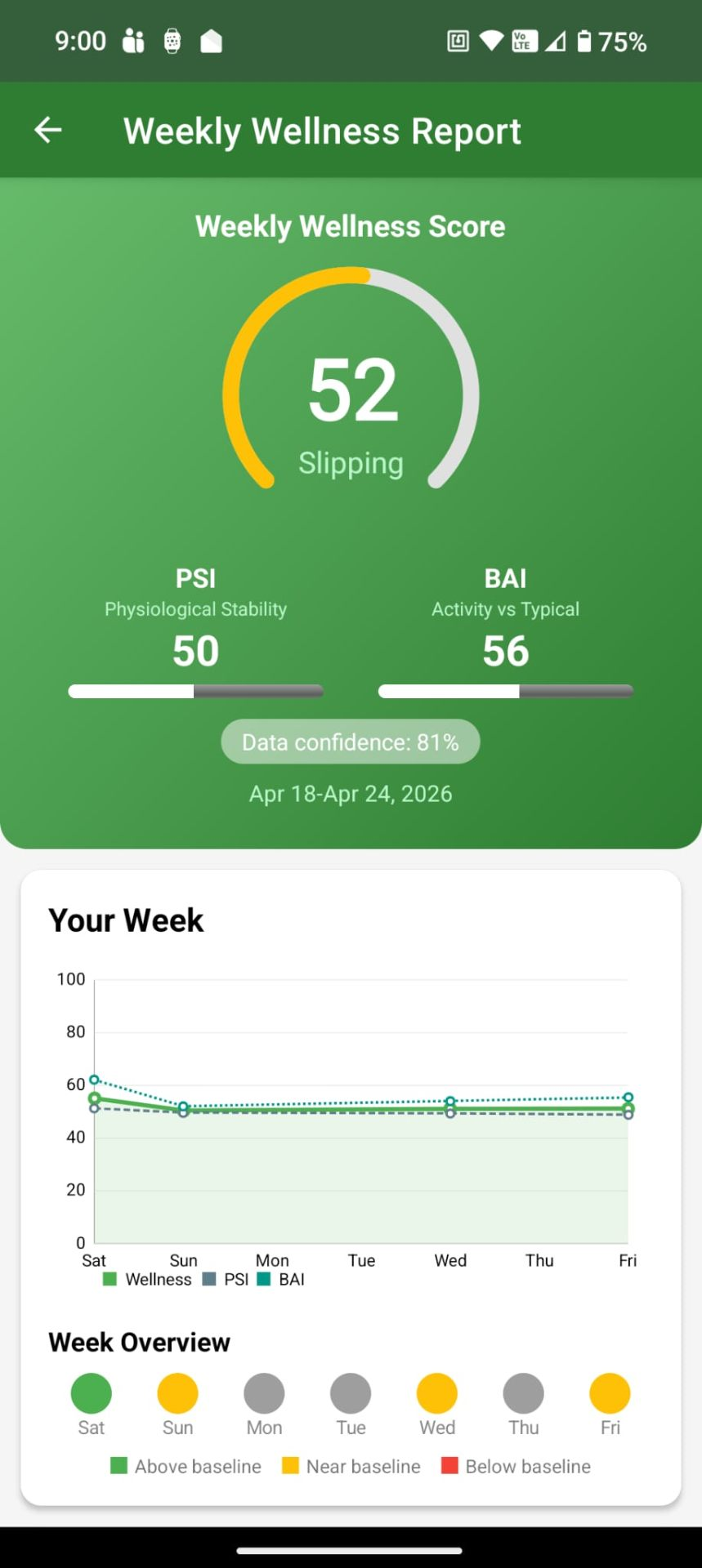
This screen shows:
- The current overall wellness level.
- Whether the direction looks stable, improving, or under pressure.
- PSI and BAI as summary indicators.
- Data confidence, showing how complete the available information is.
These indicators exist so a carer can understand the overall picture without needing to interpret individual sensor readings. If the summary looks steady and data confidence is high, there is usually nothing further to review.
Reading the Trend and Insight Screen
The trend view is where a carer moves from "what is the score today?" to "what pattern is forming?" It is worth opening whenever the summary looks different from usual.
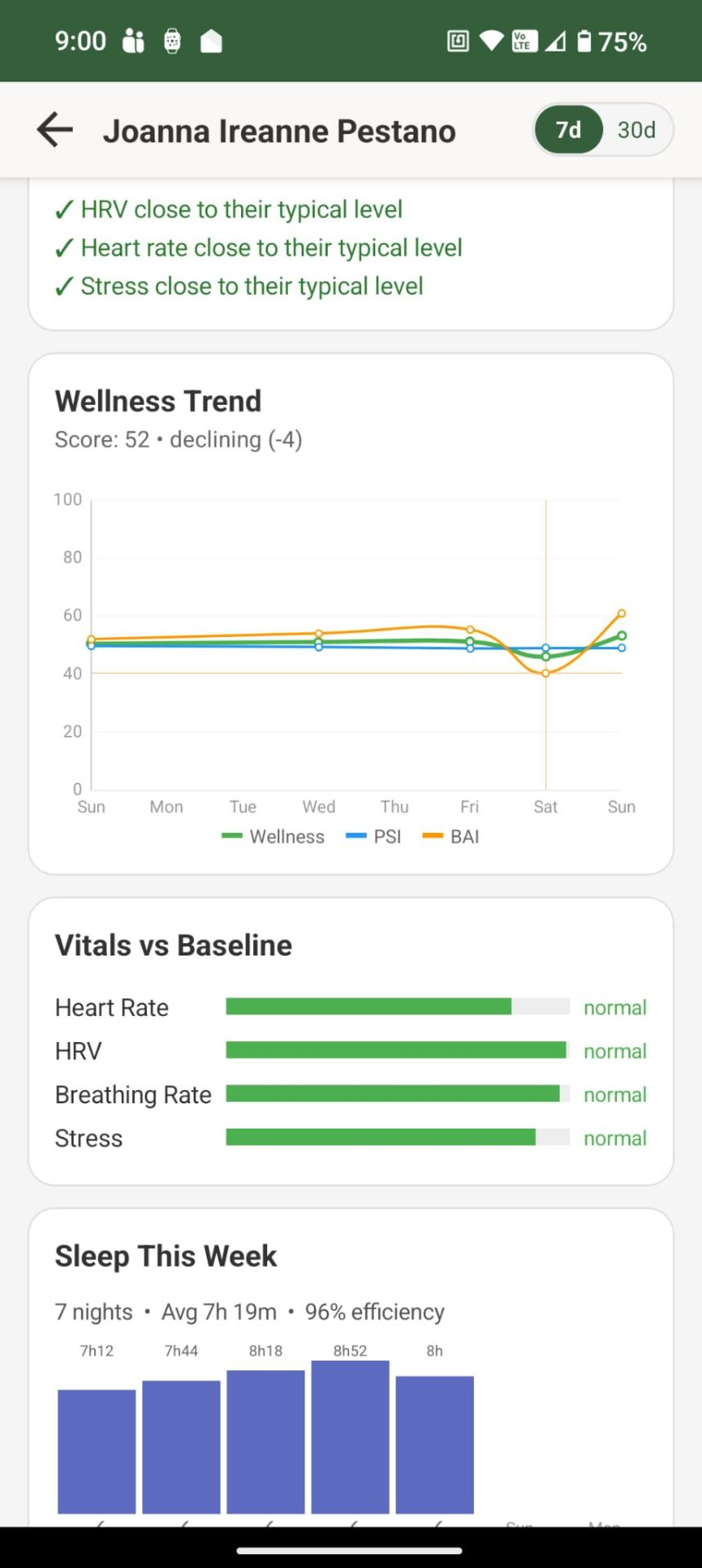
This view helps explain:
- The weekly pattern rather than only the current moment.
- How many instability events occurred during the period.
- Which signals still look close to normal.
- Which signal is beginning to drift.
- The plain-language weekly insight.
The "Signals to Watch" section is particularly useful because it turns technical measures into a practical checklist for the carer.
Taken together, the trend information is often more useful than any single measurement, because it shows how things are changing over time rather than how they looked at one isolated moment.
Why Trends Matter More Than One Reading
AiCarer is built around change detection rather than one-off interpretation. A single unusual heart-rate reading does not always tell a meaningful story. A repeated shift across sleep, movement, stress, or general stability over several days is far more informative.
This is why the trend screen matters so much. It reflects how AiCarer is meant to be used in everyday care, where patterns over time say more than any single reading.
How Location Fits In
Location information is used to add helpful context when reviewing a wellbeing event or a requested Wellness Log. Knowing where someone was at the time can make an event much easier to understand and respond to.
It is not intended as continuous live tracking. Location is only drawn on when it helps explain what happened.
In practice, that means location helps answer:
- Where was the person when this event or requested check happened?
- Does that context help the carer understand the situation?
- Does the event look more urgent because of where it occurred?
What to Expect
In everyday use, the rhythm is simple. Request a Wellness Log, wait while AiCarer processes the request, and a new Wellness Log becomes available in the Wellness Logs section. Open it to review the event details, location, AI-generated description and labels. If applicable, review the associated Wellness Report for trends and wellbeing insights.
Wellness Logs become more meaningful as AiCarer learns the person's typical patterns. Early logs may contain less context while the system is still building a baseline. This is expected behaviour, and the depth of insight grows over the first couple of weeks.
Wellness Logs are most complete when the person wears their watch regularly, the AiCarer app remains installed and running in the background, and the phone stays connected. These simple habits help AiCarer gather the information needed to build a clearer picture.
Using Wellness Logs in Everyday Care
Pulling it together, Wellness Logs and Wellness Reports work side by side to give carers a calmer view of how someone is doing:
- Wellness Logs record individual events, with details, location and labels.
- Labels make it easier to categorise and find events later.
- Wellness Reports help carers understand trends over time, providing context that individual measurements alone cannot.
- Location adds helpful context when it is appropriate.
- Together, these insights help carers decide when to check in or offer extra support.
The next chapter turns to what to do when something does not look right — the most common questions and issues carers raise, and the simple checks that usually resolve them.